The mobile office for service businesses

Your office goes where you go.

From first call to closed job.

Kallivo picks up the calls you miss, books the estimates, writes the estimate with you on site, and keeps every job moving until it's done.

Enter your website and try your office, answering as your business, in about 30 seconds. Free for 14 days, no card. Keep your number.

The lead cycle

Kallivo runs the job. You run the work.

Kallivo handles every step. You only do the parts marked in orange: walk the job, hit Send, and say what's happening.

Get the job

1

Lead comes in

Answers missed calls and website chats, day or night, several at once. Screens out sales calls. Spanish if you turn it on.

2

Booked

Gets the job, town, timeline, name and number. Books the estimate on your calendar, or as a request your office confirms. Not ready to book? Saved as a callback.

3

You know in seconds

Emails the lead to the owner, office and estimators, with a contact card and a photo summary. Copies it to your CRM.

4

Ready before you go

The night before: tomorrow's estimates with photos, a fit check, and what to ask.

5

On site

Builds the draft from your price list while you talk.

You: Show up and walk the job. Talk it through on speaker or in the app. Add photos.

Win it and run it

6

Sent

The estimate goes out from your own email, with an Accept button. Customers never hear from Kallivo. A copy goes to your CRM.

You: Check it and hit Send from your phone.

7

Won

The customer accepts online, or you mark it won. You, the office and your CRM know right away. Lost estimates get a reason, so you see your close rate.

8

On the job

Every update goes to the office and to the customer's record in your CRM.

You: Say what's happening: progress, problems, photos. You or the crew.

9

Extra work

Drafts the change order from your prices. The customer accepts it online, and the job total updates.

You: Hit Send on the change order.

10

Closed

Say "it's done." A wrap-up goes to the office and your CRM. The weekly report shows jobs won, dollars won, and your close rate.

Where jobs get lost

It's not the leads you don't get. It's the ones you drop.

You can't answer the phone from a roof. You're in a crawl space, on another call, or at your kid's game. The phone rings anyway.

The missed call

They don't leave a voicemail.

They call the next company on Google. Kallivo answers, gets the details, and books the estimate.

The slow callback

By tomorrow, they've booked someone else.

A lead that waits goes cold. You get a summary of every lead seconds after the call, with a number to tap.

The late quote

The quote goes out next week. Or never.

The other guy's quote went out the same day. Kallivo writes the estimate with you on site, so you send it before you leave.

The instant lead summary

The call ends. Seconds later, you know everything.

A lead that waits for a callback goes cold. After every call or chat, Kallivo writes up the lead and emails it right away to the owner, the office manager, or anyone else you choose. No voicemail to listen to, nothing to log in to. Read it on the job site and tap the number to call back.

  • Sent within seconds, day or night, to everyone you pick
  • A 2–3 sentence summary written for the owner, not a transcript
  • Tap-to-call number, the job, the town, the timeline, and links to any photos
  • Reply and it goes straight to the customer when they gave an email. A contact card is attached so you can save them in one tap
  • One email per lead. You get a second only if a callback gets booked or the lead turns urgent
  • Hang-ups count too. A caller who hangs up without talking still gets you a "Call back" alert with their number

What lands in your inbox

BOOKEDMaria Lopez, kitchen remodel, tomorrow (Friday) at 9 AM
CONFIRM TIMEDana Kim, bath remodel, asked for Tuesday morning
CALL BACKJake Morris, 916-555-0199
URGENTCall back: Ana Ruiz, water in basement, 916-555-0123

No calendar connected? You get a "Confirm time" alert with the customer's preferred time.

You're booked for tomorrow at 9 AM. Could you attach a few photos of the kitchen so the team comes prepared?
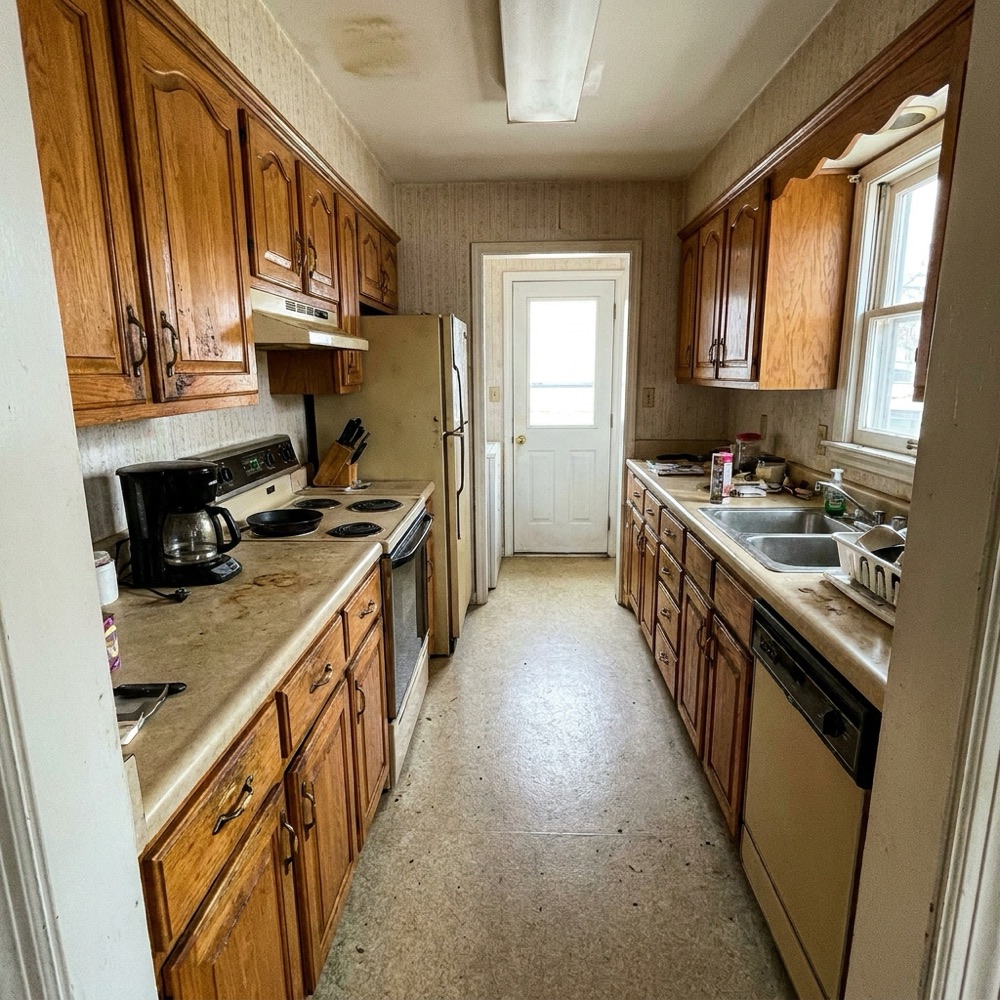
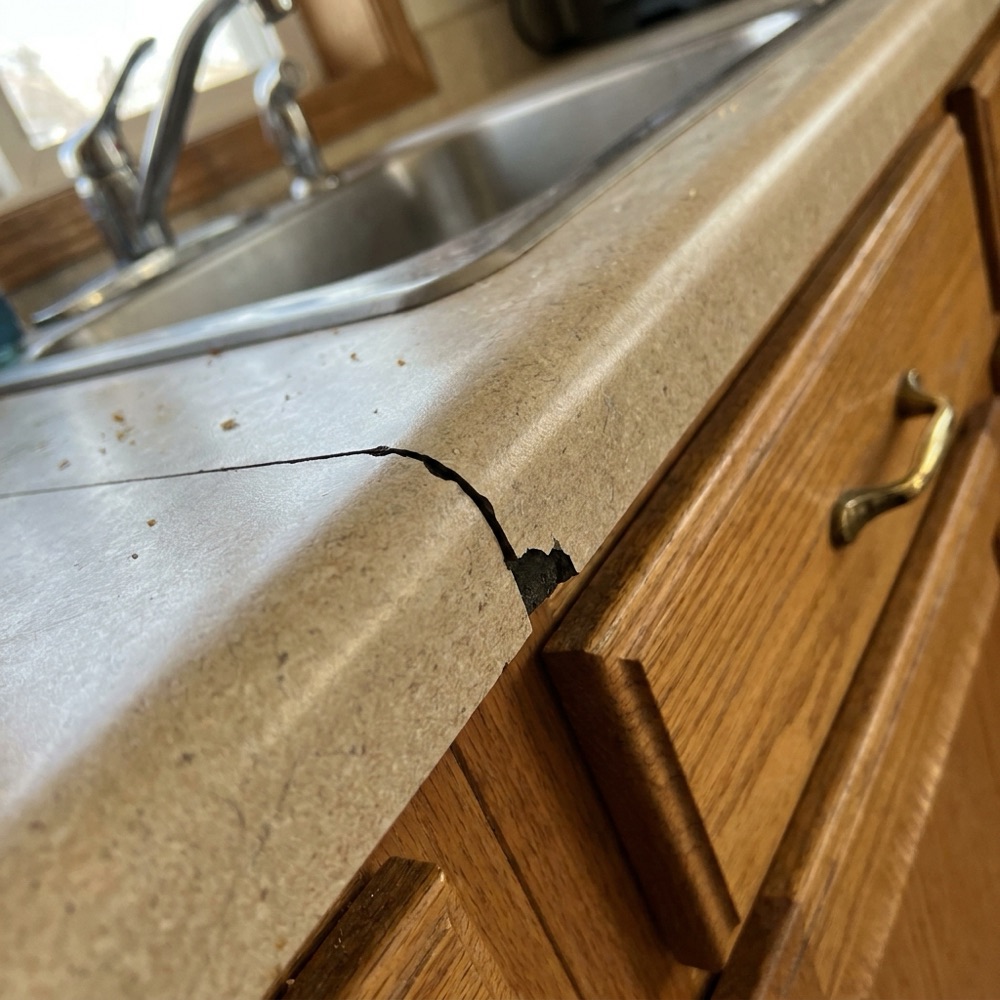
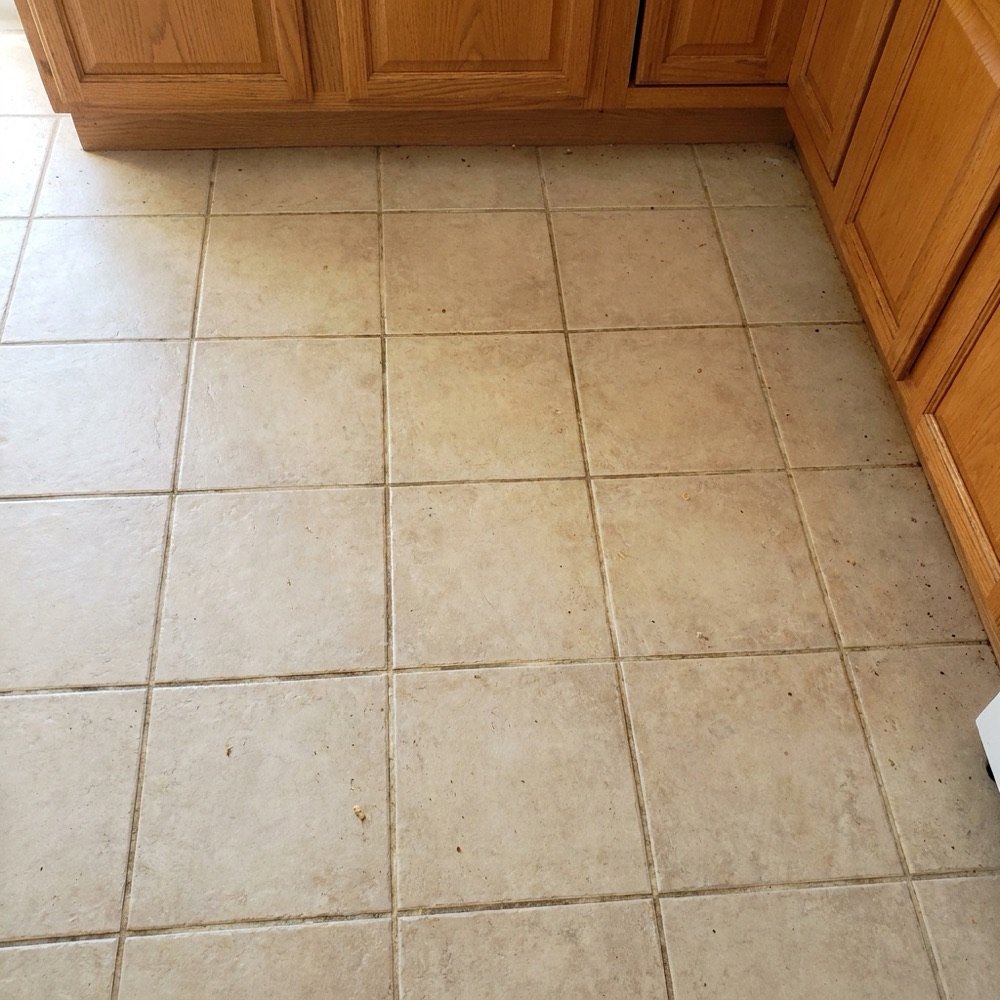
Customer photo: galley kitchen with older oak cabinets Customer photo: laminate countertop with a cracked, chipped edge Customer photo: beige ceramic tile floor with dingy grout
Thanks! Looks like older oak cabinets and laminate counters. Are the counters being replaced too, or staying?
Replacing. Hoping for quartz.

What the owner gets

Kitchen photos: older cabinets, laminate counters, tile floor in fair condition. Looks like a mid-range remodel. Customer mentioned wanting quartz and new cabinets.

Photo review

See the job before you drive out.

After a customer books on your website chat, Kallivo asks for a few photos of the space or the problem. It looks at each one, replies in plain words, and asks a useful follow-up. Then you get a short summary.

  • Arrive prepared. You know what you're walking into before the estimate
  • Skip the bad fits. Spot a job you don't do before you spend the drive on it
  • Right where you look. The summary and photos show up in the lead alert, the calendar event, the night-before job brief, and the leads page
  • Observations, not verdicts. "Looks like," "appears," "flag for." No prices and no diagnosis stated as fact. If a photo is unclear, it says so
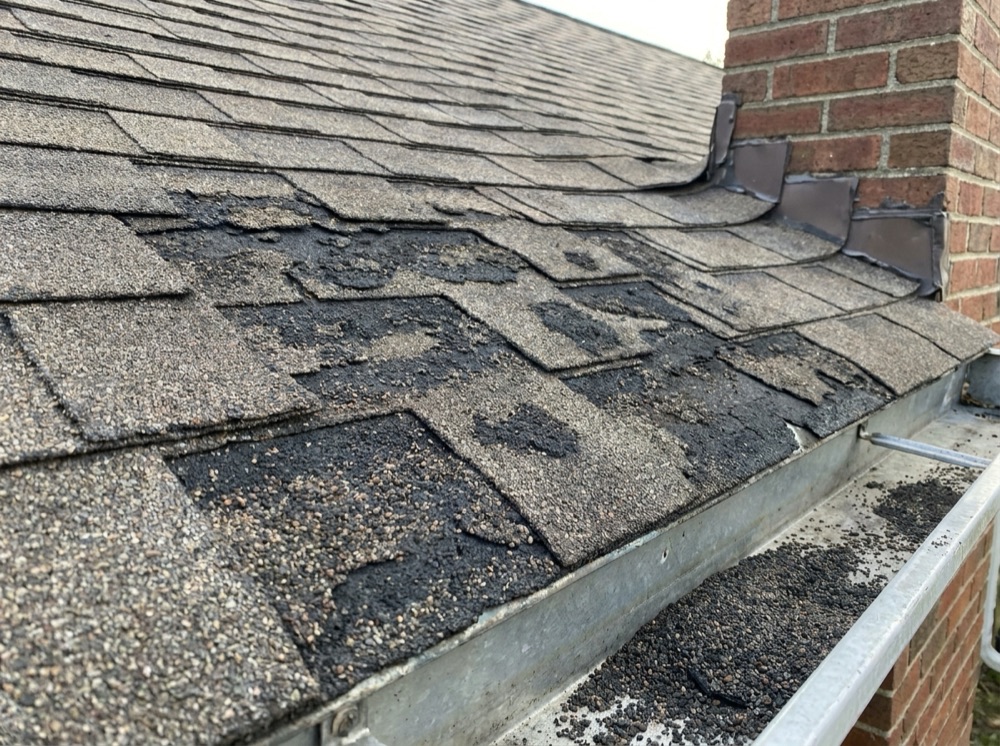
Customer photo: asphalt shingles with heavy granule loss near a brick chimney

Roof photos: heavy granule loss on the south slope, some lifting near the chimney. Appears to be a replacement candidate rather than a repair.
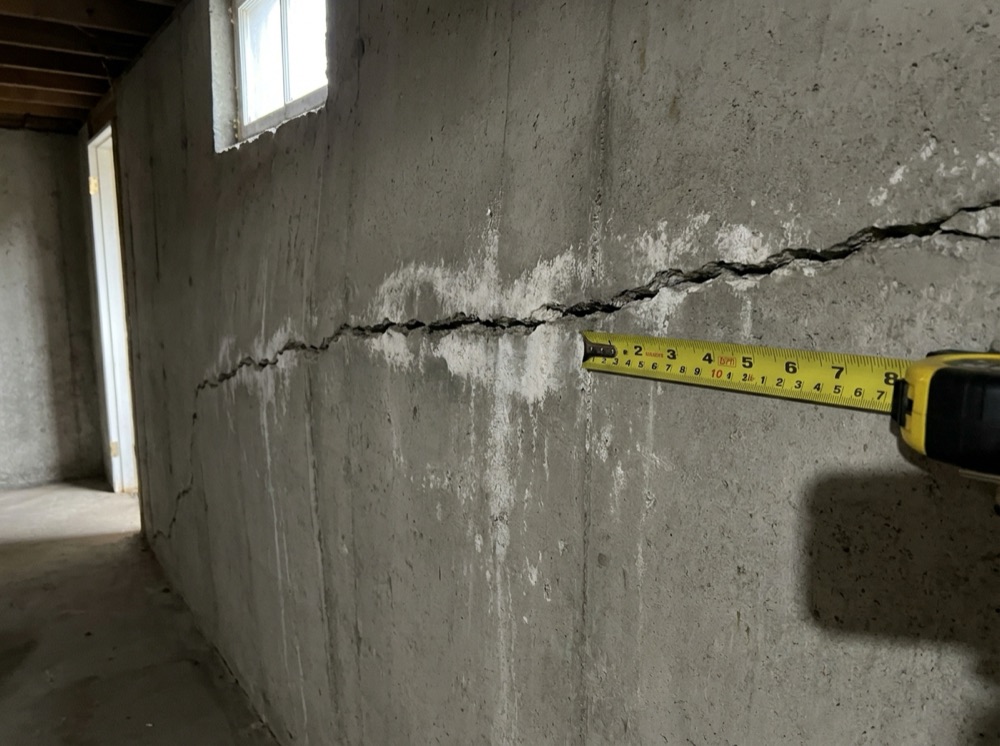
Customer photo: horizontal crack in a basement wall with a tape measure for scale

Foundation photos: horizontal crack about 1/4 inch wide with some displacement. Flag for a structural look.

On-site estimates

Measure out loud. The estimate is written before you're back in the truck.

Booking the estimate isn't the end. The part owners hate comes next: writing up the scope and sending the quote. Quotes go out days late, or never, and that's where jobs get lost. Call your Kallivo line from the job site and put it on speaker while you measure. It builds the estimate from what you say and your own prices. You check it and send it from your phone.

  • Call your Kallivo line from your phone. It knows it's you and switches to estimate mode. On speaker it confirms each measurement and does the math out loud. When you're talking to the homeowner, it just listens. Or talk or type on your leads page and add your own photos
  • Your prices only. Every number comes from what you say or from your own price list. Kallivo never sets a price. A line without a price is flagged and can't be sent
  • Customer details filled in from the lead. It checks the math out loud and tells you what's still missing
  • The draft is on your phone when you hang up, with line items, your total, your timeline, and your standard terms
  • Check it, fix anything, and tap Send. The estimate goes out from your own email address, in your own look: your logo, colors and terms. Replies land in your inbox
  • Sending marks the lead quoted and copies the estimate to your CRM. The Monday report shows the quotes you sent and their total
Kallivo · on speaker, in the backyard

Owner"Patio's 22 by 14, pavers."

Kallivo"Three hundred eight square feet. At your price that's fifty-five forty-four."

Owner"Seat wall along the back, sixteen feet. Six path lights. About a week. That's it."

Kallivo"Three lines, seven thousand eight ninety-four. The draft is in your email to check and send."

DRAFTEstimate draft: David Chen, backyard patio, $7,894

David Chen
48 Sample Lane, Folsom · 916-555-0163

Paver patio, 22 × 14 (308 sqft × $18)$5,544
Seat wall (16 lf × $85)$1,360
Path lights (6 × $165)$990
Total$7,894

Timeline: about a week

Prices: from your price list

Terms: your standard terms, added automatically

EditSend to customer

How it works

Your phone rings. If nobody gets it, Kallivo does.

You keep your number and your office. Kallivo picks up only the calls that would have gone to voicemail.

Calls forward on no answer

After about four rings, or when the line is busy, the call goes to Kallivo. That covers nights, weekends, and the times your office is on another call or out on an estimate.

It knows your business

Kallivo learns your services, your service area, and what you don't do from your website. Callers get their questions answered, the job details get taken, and the estimate gets booked. Several calls at once is fine.

You get the lead in seconds

The owner and office manager get one email per lead: who called, what the job is, where, when, and a tap-to-call number.

Every lead, handled

Every place a lead gets dropped, covered.

You can't answer when you're on a ladder.

Your calls still get answered, nights and weekends, even when several come in at once.

Voicemail loses jobs. Most people just call the next guy.

The caller gets real answers, and the estimate gets booked.

You find out about a lead hours later.

You get the name, number, job and town by email within seconds. One tap saves them to your contacts.

Website visitors leave without calling.

They get answers in the chat on your site, send photos of the job, and book the estimate.

You drive out blind.

The customer's photos and a short summary are waiting before you get there, plus a rundown of tomorrow's estimates the night before.

Your office is buried in calls.

Your office and your estimators all get every lead and every booking, so nobody has to chase anything down.

Writing estimates eats your nights.

The estimate gets written while you walk the job. Talk it through on speaker or in the app. It's built from your own prices. You check it and hit Send from the driveway.

Your prices live in QuickBooks or a spreadsheet.

Import your price list from any spreadsheet, PDF or photo. Or connect QuickBooks or a Google Sheet and it stays in sync.

You find out a customer said yes days later, buried in your email.

They accept online. You know right away, and so does the office.

The office never knows what's happening on the job.

Say it from the site. The office and your CRM get every update.

Extra work gets done on a handshake and never billed.

Say it, and the change order gets drafted from your prices. The customer accepts it online before you do the work.

Sales calls waste your day.

They get screened out and told to email.

Half your callers speak Spanish.

Spanish-speaking callers get answered in Spanish. Flip one switch.

Your CRM never gets updated.

Sent estimates land in QuickBooks with one sign-in. Every lead and job update reaches your CRM through its lead email or Zapier.

Setting up software takes weeks.

Enter your website and try your office in about 30 seconds. Going live takes a few minutes more.

Who built it

Designed and built by people who have worked in these industries, and for these industries.

We understand your workflow. We understand your customers. We understand the estimates.

Who it's for

Any service business where one missed call is a missed customer.

If you book appointments, give estimates or quotes, and spend your day with customers instead of at a desk, Kallivo is built for you.

Pricing

One missed call can cost you a $20,000 job.

Both plans include everything. Pick the one that fits your crew. Try it free for 14 days on your real calls, with your own Kallivo number. No card.

Starter

You plus one more person.

$349 / month

  • 2 people
  • 500 call minutes a month
  • Everything included
Start free for 14 days

For crews

Team

Your whole crew: estimators, crew leads and the office.

$649 / month

  • No limit on people
  • 1,000 call minutes a month
  • Everything included
Start free for 14 days

Extra minutes are $0.25 each. Your calls never stop getting answered, even in your busiest month. Full pricing details

Hear it for yourself

Call (916) 237-4755 and stay on the line.

Sofia, the AI voice of Kallivo, answers for a sample contractor. Pretend you're a homeowner: ask about a job, ask for a price, or try to sell her something. Then picture your customers getting that call at 9 PM.

Questions

The short answers.

What does it cost?

Starter is $349 a month, Team is $649. Both include everything. Try it free for 14 days, no card.

What counts as a call minute?

Time on the phone: customers calling in, and you or your team building estimates by phone. Website chat doesn't count.

Do I need a new phone number?

No. You keep your number. Your line forwards to Kallivo only when nobody answers, the line is busy, or you can't be reached.

Will callers know it's AI?

Yes. Every call opens with your business name, says it's an AI assistant, and says the call is transcribed so your team gets the details. Then it gets right to the job. Being upfront builds trust, and it keeps you on the right side of California law.

Will it quote prices or promise dates to customers?

No. On calls and chats it won't give firm prices, discounts, or crew dates. It shares only the pricing guidance you give it, and leaves the rest to you.

Does Kallivo set the price on my estimates?

No. Every price comes from what you say or from your own price list. If a line has no price, it gets flagged and the quote can't be sent until you fill it in. Nothing goes to the customer until you press Send.

Do I have to connect my calendar?

No. You can go live without it. Without a calendar, Kallivo saves the customer's preferred time as a request and your alert asks you to confirm. Connect Google Calendar or Outlook whenever you're ready.

Does it diagnose problems or measure from photos?

No. It describes what it sees, like "looks like," "appears," or "flag for a structural look," so you know what to expect. You make the call and you give the price.

Can customers text it?

Not yet. Today photos come in through the chat on your website. Texting is coming.

Does it work with my CRM?

QuickBooks connects with one sign-in: your products become your price list, and every estimate you send lands in QuickBooks for the right customer. Anything else (Jobber, HubSpot, a spreadsheet, plus 8,000+ other apps through Zapier) gets every lead, sent estimate, and job update (won, lost, progress, change orders, done) through Zapier or your CRM's lead email.

Who gets the alerts?

Whoever you pick, usually the owner and the office manager. Everyone gets the same email at the same time.

How long does setup take?

Enter your website and in about 30 seconds you can try your office, trained on your site. Going live takes a few more minutes: you get a local number, forwarding steps for your carrier, and the chat snippet for your site.

Set up your office.

Enter your website. In about 30 seconds you can try your office, trained on your services and your service area. Free for 14 days, no card.

Start free for 14 days